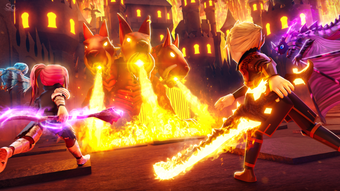

World Zero: Open-World RPG Adventure on Roblox
Is World Zero available on both Windows and Mac?
Yes, World Zero is compatible with both Windows and Mac operating systems, allowing players to access the game on their preferred desktop platform.
Is the game free to play?
Yes, World Zero is completely free to play, with no upfront cost required to access the core gameplay experience.
Does World Zero require an internet connection?
Yes, World Zero is an online multiplayer game and requires a stable internet connection to participate in quests, battles, and interactions with other players.
Can I play World Zero without a Roblox account?
No, World Zero is hosted on the Roblox platform, so a Roblox account is required to access and play the game.
Are there regular updates for World Zero?
Yes, the game receives regular updates to introduce new quests, classes, pets, and gameplay improvements, ensuring an evolving experience over time.
Overview
World Zero is a free open-world role-playing game (RPG) built on the Roblox platform, designed to deliver an expansive adventure experience for players seeking immersive storytelling, character progression, and cooperative gameplay. The game centers around choosing a base class at the start, which serves as the foundation for a customizable skill tree and evolving abilities as players level up. With a focus on exploration, combat, and progression, World Zero enables players to engage in a variety of quests—daily, weekly, worldly, and side missions—each guiding them through a dynamic world filled with enemies, dungeons, and hidden rewards.
The game’s open-world structure encourages players to roam freely, complete objectives, and interact with other players in real time. While the visual style draws inspiration from anime aesthetics, it is not directly based on any existing series. The game supports online multiplayer, allowing players to team up for boss battles, complete challenging dungeons, and assist one another in advancing their characters.
The developer did not provide additional information about the development team or company background. Real-world usage scenarios include solo exploration, group-based questing, and long-term character development through repeated gameplay sessions.
Key Features & Capabilities
- Class-Based Progression System: Players select a starting class that evolves into advanced roles such as Elementalist at rank 2, unlocking new abilities and skill paths over time.
- Pet Taming and Acquisition: Players begin with a free pet and can later obtain others through in-game exploration, purchasing from the Pet Master, or hatching eggs found in the wild.
- Diverse Quest Types: A variety of mission formats—daily, weekly, worldly, and side quests—are available, each marked by an arrow and icon to guide players to their objectives.
- Online Multiplayer Combat: Players can team up with others to tackle dungeon bosses, engage in player-versus-enemy battles, and earn rewards even when they don’t land the final blow.
- Open-World Exploration: The game features a vast, interconnected world where players can freely navigate, discover hidden areas, and encounter dynamic events and challenges.
These features support a deep and evolving gameplay loop. For example, choosing a Mage class and progressing to an Elementalist allows access to elemental spells, which can be used strategically in combat. Taming a rare pet may grant unique passive bonuses during quests.
The quest system encourages consistent engagement, with daily and weekly rewards promoting regular play. The multiplayer aspect enhances replayability, as players can form temporary or permanent alliances to take on high-level challenges. The game’s design promotes long-term investment through leveling, gear acquisition, and character customization.
User Interface, Workflow & Performance
The user interface of World Zero is designed to support seamless navigation within the open-world environment. Core elements such as the quest tracker, inventory, and skill tree are accessible through intuitive menus, with visual cues like arrows and icons guiding players toward mission objectives. The workflow is structured around a progression loop: accept a quest → travel to the location → complete the objective → return for rewards.
This cycle is consistent across all quest types and helps maintain player engagement. The game’s interface appears optimized for desktop input, supporting mouse and keyboard controls typical of PC software. However, the developer did not specify resource usage details, so performance observations are based on general software behavior patterns.
Stability during gameplay sessions is expected to be consistent with Roblox’s standard performance, though individual results may vary based on system configuration. CPU and RAM behavior were not disclosed, and no information was provided about frame rate or loading times. The game’s reliance on the Roblox platform may influence performance, particularly during peak usage hours.
Compatibility & System Requirements
World Zero is available for both Windows and Mac operating systems, ensuring broad accessibility across major desktop platforms. The software version is 1.0.0, with an installation size of 1.2 GB, which is typical for modern 3D games hosted on Roblox. The developer did not provide additional system requirements, so exact hardware specifications such as GPU, RAM, or processor details are not available.
Compatibility information was partially provided, and no specific minimum or recommended configurations were listed. Players should ensure their system meets the general requirements of the Roblox platform to run the game smoothly. The game does not appear to support mobile or console platforms.
For users considering installation, it is recommended to verify available disk space and internet connectivity prior to downloading.
Pros and Cons
Pros
- Free to play with no upfront cost
- Rich open-world environment with diverse exploration opportunities
- Deep class progression and skill customization
- Multiple ways to acquire and customize pets
- Active online multiplayer with cooperative questing and boss battles
Cons
- Exact system requirements were not listed
- Performance details were not specified by the developer
- Requires a Roblox account and stable internet connection
- Gameplay is tied to the Roblox platform, limiting standalone functionality
- May require frequent updates to maintain compatibility
Final Thoughts + CTA
World Zero delivers a compelling open-world RPG experience on the Roblox platform, combining class-based progression, pet taming, and cooperative multiplayer action into a cohesive and engaging adventure. Its free-to-play model lowers the barrier to entry, while the depth of character development and variety of quests ensure long-term replayability. The game is best suited for fans of anime-inspired RPGs, players who enjoy team-based challenges, and those seeking a persistent online world to explore.
While detailed technical specifications are limited, the core gameplay loop is well-structured and designed to keep players invested. With regular updates and an evolving world, World Zero continues to grow as a destination for desktop RPG enthusiasts. Download World Zero now to begin your journey in a vast, dynamic realm where every choice shapes your path.







